Account Engagement offers two types of automation: action-based and criteria-based.
Action-based Automation
Completion Actions
With completion actions, you can automate activities within existing elements such as custom redirects, list emails, forms, files, form handlers or page actions.
Completion actions execute every time action is completed, they are not retroactive and will not execute for image files, or anonymous visitors.
- Go to content/forms
- Edit a form
- Go to step 4
- Under completion actions, set up actions
Criteria-Based Automations
Segmentation Rules
Executes a one-time rule based on specific criteria. It retroactively evaluates all prospects and the available actions are: add/remove tags, add/remove lists, add to CRM Campaigns.
- Go to Prospects/Segmentation/Segmentation Rules
- Add a Segmentation Rule
- Set rules and action
- Run Segmentation
Automation Rules
Retroactively evaluates existing prospects and evaluates new or updated prospects against rule data. Actions won’t be reversed even if prospects unmatch the criteria.
- Go to Automations/Automation Rules
- Click Add Automation Rules
- Add rules and action
- Save rule
Sometimes it might be hard to know which automation to use so Salesforce gives us this great way to know which one to use.
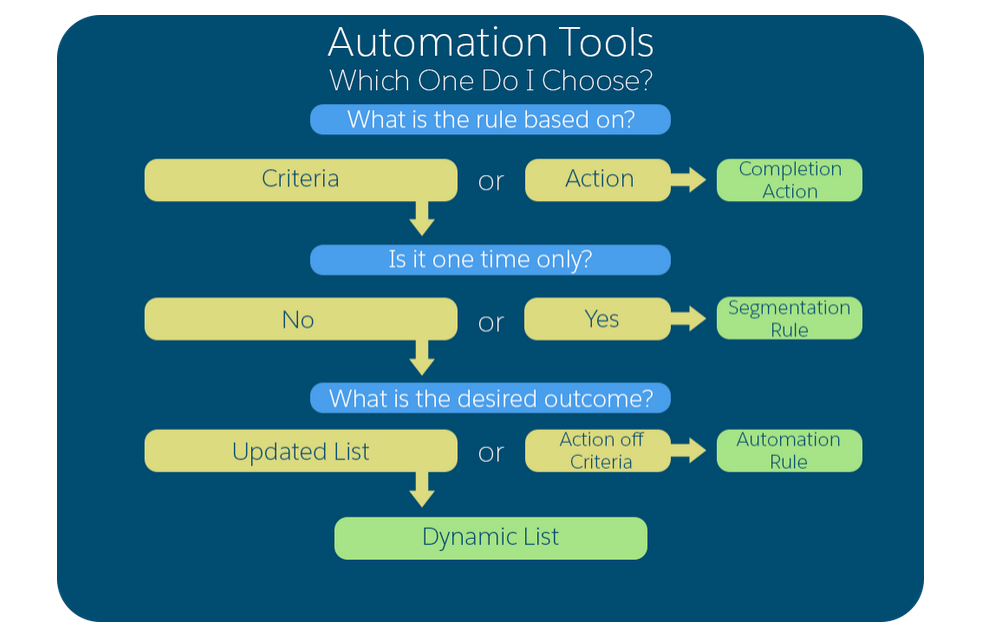
 Salesforce World
One thought on “Account Engagement (Pardot) Training Sessions – Automation”