Marketing Cloud has the ability to provide dynamic content (images), and it’s really easy to add it to your email templates. You just drag and drop the dynamic content, set up the different rules with its images and that’s it.
But what happens when you don’t want to add dynamic images, but text.
Use Case:
A business wants a specific url (e.g. dealership website) to display depending on a subscriber attribute (Subscriber Dealership).
Solution:
We are assuming you already have your sendable data extension with a column that has the subscriber dealership information:
| Id | Name | Dealership | |
| 1 | John Doe | john.doe@test.com | Toyota |
| 2 | Jane Smith | jane.smith@test.com | Honda |
You would then need to create another non sendable data extension (we will name it: Dealership Info DE) with the dealership information, making sure you add the subscriber field as primary key, in this example, dealership will be our primary key:
| Dealership | CTA Link |
| Toyota | http://www.toyota.com |
| Honda | http://www.honda.com |
Script
Then, you need to go to your email template and add AMP Script that looks like this:
%%[
VAR @CTA_Link,@DEColumn1

set @DEColumn1= Lookup("Dealership Info DE","CTA Link","Dealership", Dealership)=%%

]%%


%%=v(@DEColumn1)=%%
You always start with %%[ and end with ]%%
In line 2 of code, we are initializing the variables that we’re going to use
In line 4, we’re setting up our values with a lookup to a different data extension where:
“Dealership Info DE” is the name of the non sendable Data Extension
“CTA Link” is the name of the column in the non sendable DE, we’re grabbing the information from
“Dealership” is the name of the column in the sendable data extension that we’re matching
Dealership is the primary key used.
Add as link
Remember to add the output as a url, it will look like this: 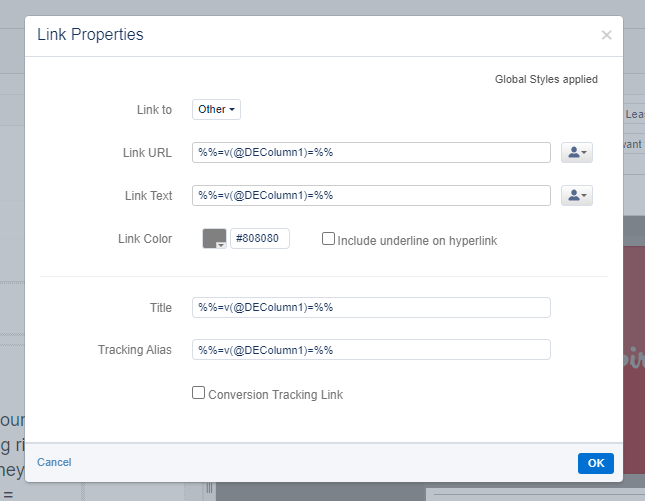
Testing
In order to test, you can go to your preview and test tab and your content will look like this depending on the subscriber attribute: 
And that’s it, you can add more columns if needed on the non sendable data extension and reference them on the script.
 Salesforce World